
Data Healthcheck for LLM Datasets
- The LLM Dataset Health Check offers a detailed dashboard to assess the quality and integrity of your instruction or preference tuning data. This ensures your dataset is well-prepared for high-quality model training by identifying issues like missing data, formatting errors, or duplication.
Why Run a Health Check?
A well-balanced, clean dataset leads to more stable and performant LLMs. This dashboard helps:
- Detect and fix quality issues early
- Understand dataset structure and content
- Maintain consistency across projects
💡Step-by-Step Guide
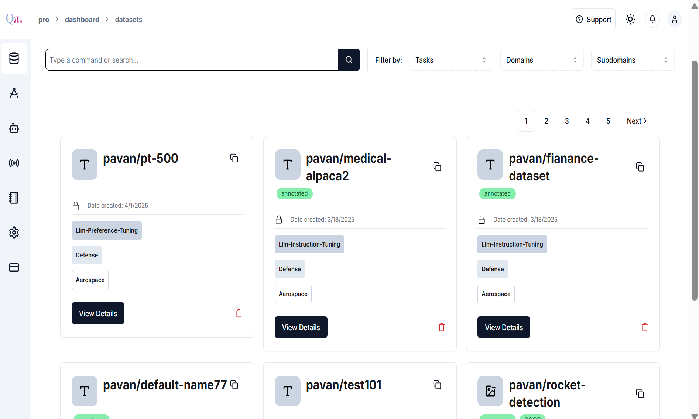
Step 1: Navigate to Your Dataset
- Go to the “Datasets” tab on the QpiAI Pro dashboard
- Select your dataset
- Click “View Details” to open the dataset overview
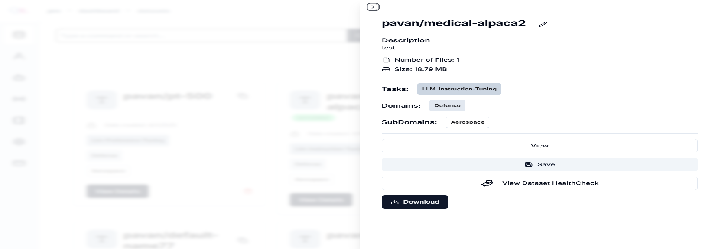
Step 2: View CSV Content
- Inside the dataset, click the “View” button
- This displays the full contents of your uploaded CSV file(prompt, output, chosen, rejected, etc).
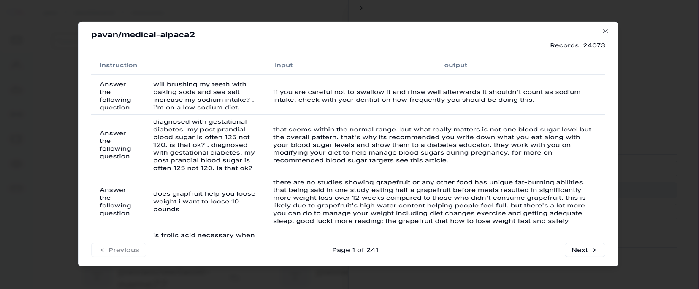
Step 3: Launch the Health Check
- Click “View Dataset HealthCheck Statistics”
- This opens the LLM Dataset Health Dashboard
Last updated on