
LLM Deployment
Options remain consistent up to the “Deployment Status” section (Refer Vision Model Development). In the Deployment Type field, please ensure to choose the appropriate format — either “Math” or “MCQ”.
- Deploying your LLM is as simple as clicking a button in QpiAI Pro. Whether it’s a powerful base model like LLaMA or Mistral, or a fine-tuned model trained on your own data, deployment is instant and hassle-free.
- After training, just head to the “Deploy” tab. QpiAI Pro spins up a secure API endpoint for your model—ready to use in real-time. You can chat with your model directly in the platform or connect to it via curl or Python for integration into any app.
LLM Chat Interface
- After deployment, just click “AI Chat” to instantly start testing your model inside QpiAI Pro.Type any question or prompt and get live responses from your deployed LLM—whether it’s a base model or a fine-tuned one.
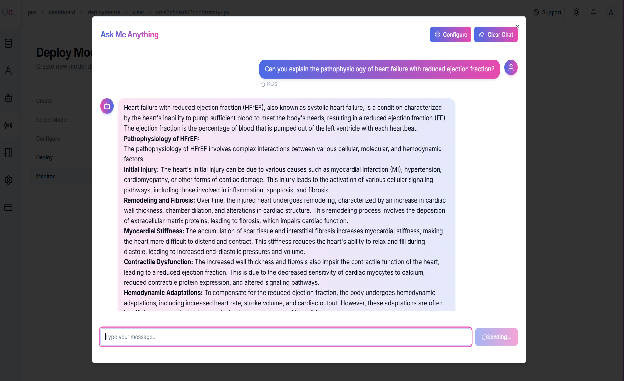
- No setup needed. Just chat, test, and iterate in real time.
Example Usage: Plug Your LLM into Any App
- Click “View Code” to get curl or Python commands.
- Use the code to call your model from any app.
- Get real-time responses for any prompt.
- Works in web, mobile, or internal tools and Secure with API key — no extra setup needed.
💡Example usage
-
The endpoint in a simple chat application. Likewise, you can seamlessly
integrate it into your own application.
Last updated on