
LLM Training and Fine Tuning
💡LLM Preference Tuning: Creating datasets for Large Language Models (LLMs) is similar to crafting a well-structured textbook. Like how a textbook organizes lessons and exercises to facilitate student learning, these datasets serve as the fundamental learning material for AI models. Well-organized datasets help models understand and improve at specific tasks, forming the foundation of their training process.
💡LLM Instruction Tuning: Fine-tuning enhances a model’s general knowledge or domain expertise, while instruction tuning specifically trains it to interpret and execute commands. This makes the model more reliable and precise in following user instructions, leading to a better understanding of user intent and more accurate, task-specific responses.
💡LLM Reasoning Model: A reasoning model is an LLM fine-tuned or designed to perform complex logical, analytical, or multi-step reasoning tasks, such as chain-of-thought and math or code generation often using datasets crafted to improve cognitive ability.
💡Understanding Model Selection
- Model selection is a crucial first step in LLM training. Like choosing the right tool for a job, different models excel at different tasks. Larger models like Llama-3B are best for general tasks, while specialized models like Qwen-3B-Coder are optimized for specific purposes like code generation. Your choice of base model will significantly impact the final performance of your trained model.
💡This are The Model Availabe for LLM Training/Fine Tuining
-
Llama Model (Most Recommended)
- Llama-3B A versatile model offering an excellent balance of capabilities, making it our top recommendation for most use cases. It excels in general tasks, writing, and analysis, providing reliable performance across diverse applications.
- Llama-8B An advanced model designed for complex and large-scale tasks, featuring superior processing power. Ideal for demanding applications that require deep analysis and comprehensive understanding.
- Llama-1B A lightweight model optimized for quick processing, perfect for straightforward tasks. It offers fast response times while maintaining good accuracy for simple applications.
-
Qwen Models
-
Qwen-7B A powerful general-purpose model specializing in complex analysis and problem-solving. It demonstrates exceptional capabilities in handling demanding tasks and detailed computations.
-
Qwen-3B-Coder A specialized model focused on programming and software development, featuring advanced code generation capabilities. It excels in technical tasks and software engineering applications.
-
Qwen-1.5B An efficient model balancing speed and capability, ideal for everyday tasks. It provides reliable performance while maintaining quick processing times.
-
-
Mistral Model
- Mistral-7B A sophisticated model excelling in natural language processing, with strong context understanding abilities. Perfect for applications requiring nuanced conversational capabilities.
-
Phi Models.
-
Phi-4B A creative-focused model specializing in storytelling and content generation. Ideal for applications requiring creative writing and innovative content creation.
-
Phi4-14B An advanced model designed for complex analysis and reasoning tasks. Excellent for applications requiring sophisticated problem-solving capabilities.
-
-
Deepseek Models (Reasoning Specialists)
-
Deepseek-7B specialized model focusing on advanced reasoning and problem decomposition. Perfect for applications requiring detailed analytical capabilities.
-
Deepseek-8B A powerful model designed for complex problem-solving and research applications. Features superior reasoning abilities for demanding analytical tasks.
-
Deepseek-1.5B A streamlined model optimized for quick reasoning tasks, offering efficient analysis capabilities while maintaining fast processing speeds.
Model Selection Guide.
- Start with LLaMA-3B for general applications that require balanced performance.
- Upgrade to LLaMA-8B for handling more complex and demanding tasks.
- LLaMA-1B to efficiently handle more complex and resource-intensive tasks, leveraging its improved architecture for faster processing, better scalability, and enhanced language understanding
- Opt for Qwen-3B-Coder for programming-focused applications.
- Choose Deepseek models when advanced reasoning and analytical capabilities are essential.
💡This selection offers a versatile range of models, catering to diverse needs—from basic tasks to highly complex problem-solving.
Steps to Train LLM.
-
Go to the “Train Model+” sections which you can find in the section bar highlighted below.
- Click on “Train Model + ” , Create Repository with a default name and Click on “Create” .
-
Next, you will be directed to the Dataset Selection page. Choose a dataset from the list of those you have uploaded,
Now you will land on the configure page. Configure Repository
- Select the domain option which suits the dataset.
- Select the suitable subdomain.
- Select the suitable data type.
- Select the suitable task.
- Describe your model in detail
-
-
Click “Continue” with the selected dataset. If you need to go back, click “Clear Section”, which will redirect you to the dataset card for further modifications.
-
Now you will land on the configure page.
- Configure Repository, Click on the “Configure”, then you will get a pop up message as “Success”.
-
You will now be directed to the “Model Type” page, Choose “Select Model” based on your requirement:
- For Training, start with a base model.
- For Fine-Tuning, use a pre-trained model to refine performance for specific tasks.

- The page for the selected model will appear. If you wish to choose a different model, Clear the selection else press Continue to proceed.
💡 Augmentation is not available for LLM. You can skip this step!
-
Now will land into the Training Model
-
Click on the “Train Model” to begin the training process.
-
Once the training is complete, a pop-up message will appear, displaying Success,
-
Model Training is initiated
🟡 a blinking yellow, starting process
🟢 a blinking green indicating the process is completed
-
After a short wait, the “Training Dashboard” will open, displaying the relevant section. Select “View Experiment” to track progress. This dashboard provides real-time updates on training status and key metrics.
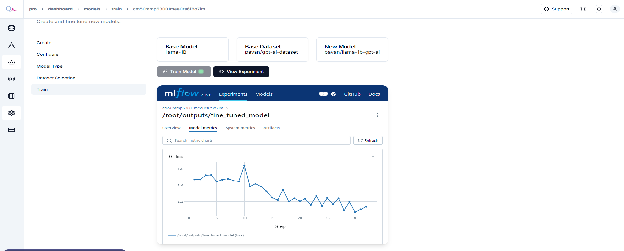
🔴 a blinking red indicates the process is Failed, You can choose to Re-try !
- Training the Model or Raise an Issue for support.
- Go To show in the right top corner
- Select Type > Issue Description > Submit.